


MongoDB Database Plug-In for OPC Router - License type: Subscription license for 1 year

This OPC Router plug-in allows you to connect MongoDB databases to various IT and OT systems across the entire infrastructure. The plug-in is an OPC Router accessory. Más
Código del producto: OPCR-MONGOD-SUB-PROD
This OPC Router plug-in allows you to connect MongoDB databases to various IT and OT systems across the entire infrastructure. The plug-in is an OPC Router accessory. Más
Código del producto: OPCR-MONGOD-SUB-PROD
Opciones 9
| License type | Código | Disponibilidad | Precio sin IVA | |
|---|---|---|---|---|
| Subscription license for 1 year | OPCR-MONGOD-SUB-PROD | En stock |
465 EUR
|
|
| Subscription license for 2 years | OPCR-MONGOD-SUB-PROD 2x | En stock |
930 EUR
|
|
| Subscription license for 3 years | OPCR-MONGOD-SUB-PROD 3x | En stock |
1 395 EUR
|
|
| Perpetual (permanent) license with 1 year support | OPCR-MONGOD-PRP-PROD + OPCR-MONGOD-ATT-PROD | En stock |
1 081 EUR
|
|
| Perpetual license with 2 years support | OPCR-MONGOD-PRP-PROD + OPCR-MONGOD-ATT-PROD + OPCR-MONGOD-EXT-PROD | En stock |
1 283 EUR
|
|
| Perpetual license with 3 years support | OPCR-MONGOD-PRP-PROD + OPCR-MONGOD-ATT-PROD + 2x OPCR-MONGOD-EXT-PROD | En stock |
1 485 EUR
|
|
| Perpetual license support extension for 1 year | OPCR-MONGOD-EXT-PROD 1x | En stock |
202 EUR
|
|
| Perpetual license support extension for 2 years | OPCR-MONGOD-EXT-PROD 2x | En stock |
404 EUR
|
|
| Perpetual license support extension for 3 years | OPCR-MONGOD-EXT-PROD 3x | En stock |
606 EUR
|
OPC Router is a software program that allows you to connect data from various industrial devices and IT/OT systems to each other. All this quickly, automatically and without programming knowledge. In addition, you can see all data flows in a clear visualization.
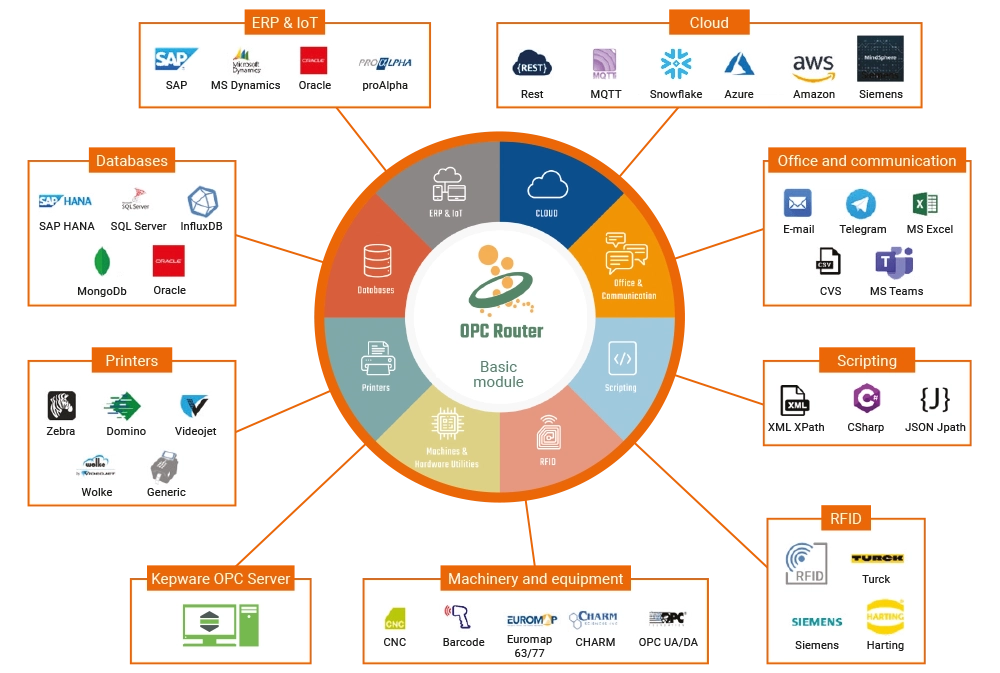
Collect data, connect systems, perform calculations, compare values and enter results into databases. You can do all this with OPC Router for PLC systems, OPC servers, printers, RFID readers, emails, Excel spreadsheets, databases, cloud systems, MQTT brokers, ERP systems SAP R3, SAP HANA, etc. For installation on a single computer you need a basic module and one or more plug-in modules.
Mongo DB Plug-In
The MongoDB database is one of the most widely used NoSQL databases. This document-oriented database is very well suited for distributed use and the processing of large numbers of JSON documents.
With the MongoDB plug-in and other OPC Router plug-ins installed, you can connect MongoDB databases to various other systems across the Industry 4.0 infrastructure. Systems connected to the OPC Router can read/write data from/to these databases.
Storing PLC process data in a MongoDB database via OPC UA
In the picture below, you can see a connection that has been configured to read data from a PLC connected via KEPServerEX. Whenever the temperature changes, the Data change trigger (1) triggers the connection. Data is read from KEPServerEX (2). In the OPC Router, this data is used to generate a JSON document (3), which is then stored in the MongoDB database (4).
In the top of the picture, you can see the live graph (5), which allows for the monitoring and diagnostics of the connection. Each green dot on the line means that the trigger has been activated and that the connection is fault-free.

Requisitos del sistema
Instalación y actualización
El paquete de instalación de OPC Router instala el entorno de configuración, los servicios de Windows y todos los plug-ins en modo demo con un tiempo de ejecución de 2 horas. Los plug-ins licenciados solo pueden ejecutarse sin límite de tiempo después de introducir la clave de licencia.
La instalación no incluye ningún sistema de base de datos ni servidor OPC para uso en producción. Estos componentes deben instalarse por separado y luego conectarse en la configuración de OPC Router.
Rendimiento del ordenador
OPC Router es una aplicación de servidor, por lo que recomendamos ejecutarlo en un hardware adecuado. Para una implementación habitual, recomendamos:
- procesador multinúcleo,
- mínimo 8 GB de RAM,
- almacenamiento SSD.
Sistema operativo
Para el uso en producción recomendamos sistemas operativos Microsoft Windows Server. También se pueden utilizar sistemas operativos cliente de 64 bits, especialmente para pruebas.
Sistemas operativos compatibles:
- Windows Server 2016 x64
- Windows Server 2019 x64
- Windows Server 2022 x64
- Windows Server 2025 x64
- Windows 10 x64
- Windows 10 IoT x64
- Windows 11 x64
Ejecución en Docker
OPC Router también puede ejecutarse en un contenedor Docker, por ejemplo en un dispositivo Edge o en un dispositivo con Windows. Los requisitos mínimos para ejecutarlo en un contenedor Docker son:
- procesador de un solo núcleo de 64 bits a 600 MHz con soporte AVX,
- 512 MB de RAM,
- 3 GB de espacio libre en disco.
.NET 8
OPC Router requiere el entorno .NET 8. Si no está instalado en el sistema, la instalación de OPC Router lo instalará si es necesario.
En entornos de producción recomendamos instalar .NET 8 manualmente desde Microsoft antes de actualizar OPC Router. La instalación de .NET puede requerir actualizaciones de Windows, tardar más tiempo y, en algunos casos, requerir varios reinicios. Para reducir el tiempo de parada, recomendamos desinstalar las versiones anteriores de .NET solo después de que .NET 8 se haya instalado correctamente.
Servidor OPC
Para conectar sistemas de control mediante OPC, debe estar disponible un servidor OPC instalado y accesible. OPC Router admite conexiones mediante OPC DA 4.0, OPC UA y OPC XML.
Para la comunicación con un servidor OPC se requiere el plug-in OPC correspondiente.
Servidor de base de datos y fuentes de datos
Los servidores de bases de datos no forman parte de la instalación de OPC Router. Si desea conectarlos con OPC Router, deben instalarse y ponerse a disposición por separado.
OPC Router admite la conexión con los siguientes sistemas de bases de datos e interfaces:
- Microsoft SQL Server
- Oracle
- MySQL
- SAP HANA
- OLE DB
- sistemas accesibles mediante ODBC
También es posible conectar las siguientes bases de datos, fuentes de datos o archivos:
- MS Access
- SQLite
- dBase
- InfluxDB
- MongoDB
- archivos XML
Los plug-ins para la comunicación con bases de datos no están incluidos en la licencia Basic. Para cada tipo concreto de conexión a base de datos, es necesario seleccionar el plug-in correspondiente.
Conexión a base de datos Oracle
Para conectarse a una base de datos Oracle, es necesario tener instalado Oracle Instant Client (ODAC).
SAP Plug-in
El SAP Plug-in es compatible con sistemas SAP versión 4.0b o superior. En el ordenador con OPC Router debe estar instalado SAP Logon Pad o la biblioteca librfc32.dll.
Para utilizar SAP NetWeaver, es necesario instalar SAP NetWeaver RFC SDK.
El SAP Plug-in es un módulo con licencia independiente y no está incluido en la licencia Basic.
New features in the OPC Router 5.1 data hub
The new version of OPC Router 5 brings some big changes. The biggest change is the user interface, which brings the user more comfort when working with the program and the ability to work in Linux, macOS, etc. There are also new options for creating user accounts, improvements in application performance optimization and many other improvements.
Highlighted items are mandatory.

OPC Router – módulo básico
286,77 EUR IVA incl.
Productos relacionados1
OPC Router – módulo básico
286,77 EUR IVA incl.