
How to choose the right combination of auto.spy licences

Diagnostic software auto.spy is used to record and retrospectively analyze the behavior of a machine or technology. It is used for finding the causes of faults, long-term equipment monitoring, process optimization, commissioning, and documenting the actual course of events.
The basis is always auto.spy analyzer. Separate drivers are then selected according to where you need to obtain data from – for example from a Siemens SIMATIC S7 PLC, an older SIMATIC S5 PLC, an OPC UA/DA server, an IP/USB camera, or an external LabJack U12 measuring device.
The choice of licence therefore mainly depends on two questions: which data source you need to monitor and how precise the recording needs to be. For standard long-term monitoring of equipment with Siemens S7, a different driver is used than for precise recording of a fast event within one PLC cycle. If the data is available via an OPC server, the OPC UA/DA driver is used. If you also need to see the actual movement of the machine together with the data, the driver for IP and USB cameras is added.
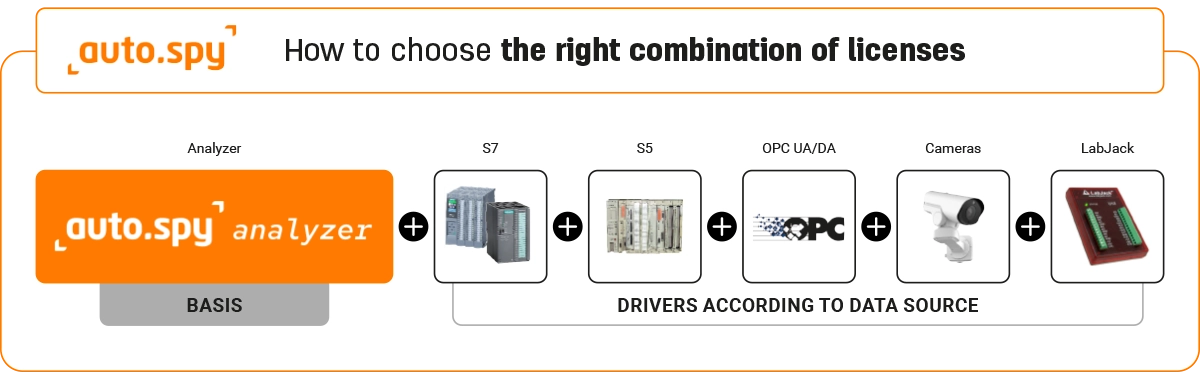
Recommended packages by situation
1. I need continuous long-term monitoring of equipment with Siemens S7
Choose this option if the equipment is controlled by a Siemens SIMATIC S7-300, S7-400, S7-1200 or S7-1500 PLC and you need to monitor what happens during normal operation. It is suitable for finding the causes of faults, monitoring states, trends, slower process values, and long-term recording of equipment behavior.
auto.spy reads selected values from the PLC at a regular time interval configured in auto.spy. This is suitable for situations where you do not need to record every PLC cycle, but you need a clear time-based overview of values and states.
The advantage is that there is no need to modify the PLC control program. The technician can therefore retrospectively evaluate what happened on the equipment before, during, and after a fault without having to interfere with the PLC program.
Recommended combination:
auto.spy analyzer + SIMATIC S7 driver with sample-time precision
2. I need to troubleshoot a short or irregular event in a Siemens S7 PLC
Choose this option if the equipment is controlled by a Siemens SIMATIC S7-300, S7-400, S7-1200 or S7-1500 PLC and you need to determine more precisely what happened in the PLC during a fast or hard-to-capture event. It is suitable for short pulses, fast state changes, edges, alarms, signal sequences, and errors that appear only for a moment.
auto.spy records selected values synchronously with the PLC cycle. This is suitable for situations where a continuous time-based recording is not enough and you need to see a more detailed course of values and states in individual PLC cycles.
This measurement method requires modification of the PLC project / uploading a measuring section to the PLC. The technician can therefore evaluate in detail what happened in the PLC before, during, and after the event, but more preparation is required than with standard periodic reading of values from the PLC.
Recommended combination:
auto.spy analyzer + SIMATIC S7 driver with one-PLC-cycle precision
3. I need universal diagnostics for equipment with Siemens S7
Choose this option if the equipment is controlled by a Siemens SIMATIC S7-300, S7-400, S7-1200 or S7-1500 PLC and you do not want to decide in advance whether standard periodic value reading will be sufficient or whether precise recording in the PLC cycle will be required. It is suitable for service, maintenance, fault analysis, commissioning, and long-term monitoring of equipment behavior.
auto.spy can combine both recording methods. Slower values, states, trends, and long-term behavior can be monitored using regular reading from the PLC at a time interval configured in auto.spy. Fast events, short pulses, edges, alarms, or precise signal sequences can at the same time be handled by recording synchronously with the PLC cycle.
The advantage is that the technician has both a simpler monitoring method without modifying the PLC program and a more precise measurement method for fast events. In practice, the technician can start with standard value recording first and then add precise recording in the PLC cycle if needed.
Recommended combination:
auto.spy analyzer + SIMATIC S7 driver with sample-time precision + SIMATIC S7 driver with one-PLC-cycle precision
4. I need to diagnose older equipment with Siemens SIMATIC S5
Choose this option if the equipment is controlled by an older Siemens SIMATIC S5 PLC and you need to find out what happens during operation. It is suitable for service, fault analysis, state monitoring, and documentation of the behavior of older equipment.
The driver for SIMATIC S5 is available only for the 32-bit version of auto.spy. This is important mainly during installation – for S5, the 32-bit version of the program must be used, not the standard 64-bit installation.
Data from the SIMATIC S5 PLC is recorded via the AS511 PG interface. On the PLC side, this is typically an older TTY / 20 mA interface, so a standard serial cable is not enough. In practice, it is necessary to verify the specific S5 CPU type and the method of physical connection to the computer.
If the computer has an RS232/COM serial port, an RS232 adapter for SIMATIC S5 can be used. If the computer only has USB, you need to choose a converter that has a driver for the Windows version being used.
Note: not all SIMATIC S5 configurations are supported by this auto.spy driver, so it is advisable to verify compatibility in advance according to the list on the Features tab of the auto.spy product.
Recommended combination:
auto.spy analyzer + SIMATIC S5 driver with one-PLC-cycle precision
5. I need to diagnose equipment using data from an OPC server
Choose this option if you need to record data from equipment but do not want to or cannot read it directly from the PLC using an auto.spy driver. This typically applies when the data is already available via an OPC server, such as Kepware Server, or when you need to get data from another PLC or system into auto.spy.
In this case, the OPC server acts as an intermediary between the equipment and auto.spy. The values are therefore not read directly from the PLC, but from the OPC server via the OPC UA or OPC DA interface. This makes it possible to record data in auto.spy even from various devices for which auto.spy does not have its own direct driver.
This method is suitable for standard diagnostics, long-term value monitoring, documentation of equipment behavior, and comparison of data from multiple parts of the technology. It is practical especially where an OPC server already exists in production, or where it makes sense to add one to unify data from multiple sources.
Recommended combination:
auto.spy analyzer + OPC UA/DA driver
6. I need to see the actual machine behavior on camera together with the data recording
Choose this option if recording values from the PLC or OPC server alone is not enough and you also need to see the physical behavior of the machine. It is suitable, for example, when looking for the causes of faults, material jams, checking mechanical movement, monitoring a conveyor, cylinders, axes, robot movement, or operator reaction.
The driver for IP and USB cameras adds machine video to the data recording. For simultaneous value recording, you therefore also need to select a data driver according to the data source. If you read values from Siemens S7, use the S7 driver. If you read values via an OPC server, use the OPC UA/DA driver.
For video recording, you can use an IP camera supporting standard video protocols such as ONVIF or RTSP, or a USB camera compatible with DirectShow.
The advantage is that the technician can see equipment values and camera video in the same time period. This makes it possible to retrospectively compare what the signal from the PLC or OPC server showed and what actually happened on the machine at the same moment.
Recommended combination:
auto.spy analyzer + data driver according to the data source + driver for IP and USB cameras
7. I need to measure a signal that is not available in the PLC or via an OPC server
Choose this option if you need to record a value in auto.spy that is not available in the PLC or via an OPC server, or if you want to verify it by independent measurement. This may be, for example, a value from a temporarily connected sensor, voltage check, sensor state verification, or another service measurement outside the control system.
These analog and digital electrical signals are measured by an external LabJack device, which is connected to the computer with auto.spy via USB.
The technician can therefore compare the value or state read from the PLC with an independent measurement of the physical signal. This is useful especially when looking for the causes of faults where it is not clear whether the problem originates in the control system, electrical installation, or the actual machine mechanics.
Recommended combination:
auto.spy analyzer + LabJack driver including HW
8. I need to cover most service situations on modern machines
Choose this option if you want to use auto.spy as a universal diagnostic tool for service, maintenance, or technical support. It is suitable for situations where you do not know in advance whether you will read data directly from a Siemens S7 PLC, via an OPC server, or whether you will need to add video recording from a camera.
The package covers standard long-term monitoring of equipment with Siemens S7, precise recording of fast events in the PLC cycle, reading data via an OPC UA/DA server, and video recording of actual machine behavior. The technician can therefore handle standard faults, fast signals, data from different systems, and comparison of values with what is physically happening on the machine.
The advantage is that this is a practical combination for most service situations on modern machines. If the problem concerns Siemens S7, one or both S7 drivers can be used. If the data is available via an OPC server, the OPC UA/DA driver is used. If the actual machine movement also needs to be seen, camera recording is added.
Recommended combination:
auto.spy analyzer + S7 driver with sample-time precision + S7 driver with one-PLC-cycle precision + OPC UA/DA driver + driver for IP and USB cameras
9. I need the broadest possible diagnostic equipment
Choose this option if you want to use auto.spy as a universal service tool for different types of machines, different PLCs, and different data sources. It is suitable for a service team that works with modern equipment with Siemens S7, older machines with Siemens SIMATIC S5, data available via an OPC server, camera recording, and independent signal measurement outside the control system.
The package covers standard long-term monitoring of equipment with Siemens S7, precise recording of fast events in the PLC cycle, diagnostics of older equipment with SIMATIC S5, reading data via an OPC UA/DA server, video recording of actual machine behavior, and measurement of analog and digital electrical signals using a LabJack device.
The advantage is that the technician has practically all main recording options in auto.spy available and does not need to solve which driver is missing for each service case. This package makes sense mainly for companies that use auto.spy repeatedly at different customers or on different types of technologies.
Recommended combination:
auto.spy analyzer + S7 driver with sample-time precision + S7 driver with one-PLC-cycle precision + S5 driver + OPC UA/DA driver + driver for IP and USB cameras + LabJack driver including HW
10. I am commissioning equipment and need to verify its behavior
This situation applies when commissioning a new machine, line, or technology modification. The goal is to verify whether individual signals, states, and equipment steps occur in the correct order and at the correct time.
auto.spy helps create a clear recording of the course of values and states. The technician can therefore retrospectively show what actually happened during testing, where a delay occurred, why the equipment did not move to the next step, or whether the machine behavior matches expectations.
Such a recording can also be used as proof of correct equipment behavior during commissioning, or as supporting material for documenting a fault or further technical evaluation.
The choice of driver depends on the data source. For equipment with Siemens S7, the S7 driver is used; for data via an OPC server, the OPC UA/DA driver is used. If the data needs to be compared with the actual machine movement, the driver for IP and USB cameras is added.
Recommended combination:
auto.spy analyzer + driver according to the data source + optionally driver for IP and USB cameras
11. I want to optimize the production cycle and find unnecessary delays
This situation applies when the equipment works, but the cycle is slow, irregular, or has unnecessary waiting times. The goal is to find where the delay occurs, why a certain step takes longer, or why signals do not follow each other as they should.
auto.spy makes it possible to compare the course of values and states over time. The technician can retrospectively evaluate which part of the equipment cycle causes the delay, how a good and bad cycle differ, or what changed after adjusting the settings.
The choice of driver depends on the data source. If the values are in a Siemens S7 PLC, the S7 driver is used. If they are available via an OPC server, the OPC UA/DA driver is used. The driver for IP and USB cameras makes sense when the actual machine movement also needs to be seen.
Recommended combination:
auto.spy analyzer + driver according to the data source + optionally driver for IP and USB cameras
Recommended products1

auto.spy - software for diagnostics of SIMATIC S7-300/-400/-1200/-1500 and S5 PLCs, OPC UA/DA data and camera recordings
ab 702,10 EUR Inkl. MwSt.