
Software for data transfer between PLCs, databases and the cloud – SIA Connect SW - SIA Connect SW: 0-500 items

Software zum Auslesen von Daten aus SPS und Geräten wie Siemens SIMATIC S7 / LOGO!, Mitsubishi, Allen-Bradley, Omron, Beckhoff, Modbus, OPC UA usw. Ermöglicht das Lesen von Daten aus einer SPS und das Schreiben in eine andere SPS. Dank integrierter Konnektoren werden Daten in Datenbanken (SQL, MySQL, PostgreSQL, InfluxDB usw.) gespeichert und können gleichzeitig in die Protokolle OPC UA oder MQTT für übergeordnete IT-Systeme oder die Cloud konvertiert werden. Bei Verbindungsunterbrechung werden die Daten intern gespeichert und nach Wiederherstellung der Verbindung automatisch übertragen. Die Konfiguration erfolgt über eine Weboberfläche ohne aufwendige Programmierung. Enthält ein Plug-in zur Datenvisualisierung in Grafana Dashboards. Die Software kann auf beliebiger Hardware installiert und auf verschiedenen Plattformen betrieben werden (Linux, Windows über Docker, virtuelle Maschinen, Embedded-Systeme usw.). More
Code: SIA-ANYWARE-PERP-500
Software zum Auslesen von Daten aus SPS und Geräten wie Siemens SIMATIC S7 / LOGO!, Mitsubishi, Allen-Bradley, Omron, Beckhoff, Modbus, OPC UA usw. Ermöglicht das Lesen von Daten aus einer SPS und das Schreiben in eine andere SPS. Dank integrierter Konnektoren werden Daten in Datenbanken (SQL, MySQL, PostgreSQL, InfluxDB usw.) gespeichert und können gleichzeitig in die Protokolle OPC UA oder MQTT für übergeordnete IT-Systeme oder die Cloud konvertiert werden. Bei Verbindungsunterbrechung werden die Daten intern gespeichert und nach Wiederherstellung der Verbindung automatisch übertragen. Die Konfiguration erfolgt über eine Weboberfläche ohne aufwendige Programmierung. Enthält ein Plug-in zur Datenvisualisierung in Grafana Dashboards. Die Software kann auf beliebiger Hardware installiert und auf verschiedenen Plattformen betrieben werden (Linux, Windows über Docker, virtuelle Maschinen, Embedded-Systeme usw.). More
Code: SIA-ANYWARE-PERP-500
Options 5
| SIA Connect SW | Code | Verfügbarkeit | Price Exkl. MwSt. | |
|---|---|---|---|---|
| 0-500 items | SIA-ANYWARE-PERP-500 | In stock 9 pcs |
600 EUR
|
|
| 501-2000 items | SIA-ANYWARE-PERP-2000 | In stock 10 pcs |
1 320 EUR
|
|
| 2001-5000 items | SIA-ANYWARE-PERP-5000 | In stock 10 pcs |
2 640 EUR
|
|
| 5001-7500 items | SIA-ANYWARE-PERP-7500 | In stock 10 pcs |
3 960 EUR
|
|
| 7500+ items | SIA-ANYWARE-PERP-UNLIMITED | Inquire product |
Na dotaz
|
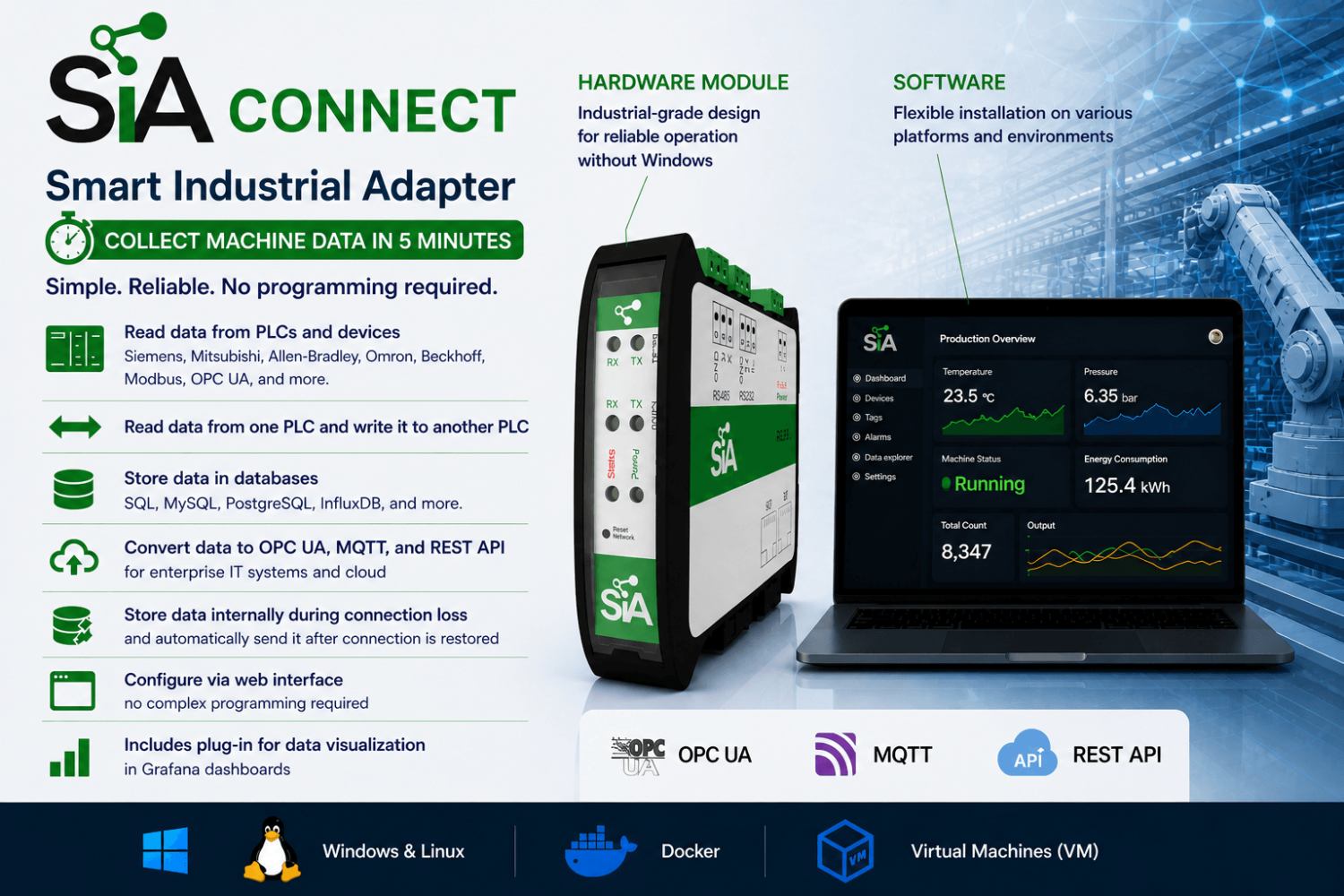
Who is SIA Connect SW intended for?
- Manufacturing plants – data collection from machines with storage in databases for subsequent reporting and monitoring; suitable if you want to run on your own server or PC.
- System integrators – easy integration of data between different PLCs and devices, with the option to store data in databases and enterprise IT applications.
- Machine builders (OEMs) – a cost-effective and reliable solution for collecting data from machines worldwide (condition monitoring, reports, etc.); the ability to choose a license based on the number of read values (items); easy deployment on own hardware.
- Building and energy management (BMS) – data collection from building technologies (heating, cooling, ventilation, energy metering) and transfer to central systems for monitoring and reporting.
- Projects with multiple manufacturers and protocols – integration of data between devices that do not normally communicate with each other, including device-to-device communication.
- Projects with a higher number of values – when 500 values are not sufficient and you need hundreds to thousands of values (up to 7,500+ depending on the license).
- Companies using virtualization / Docker – suitable for native operation on Linux or via Docker (on Windows and macOS via Docker only) and for leveraging existing server infrastructure.
This SW variant is not intended for users who want a ready-made device for installation in a control cabinet without their own PC/server. For such use cases, the SIA Connect HW hardware variant (up to 500 values) is more suitable.
SIA Connect use cases
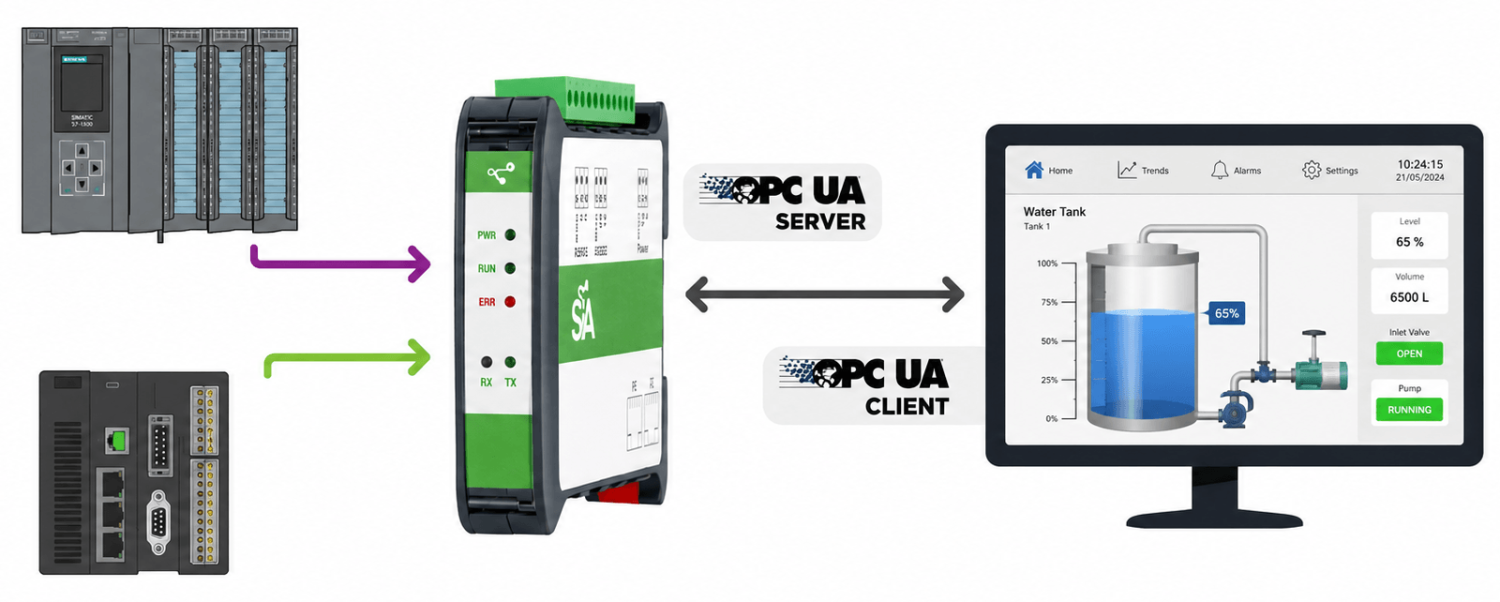
SIA Connect reads data from various PLC types using built-in drivers and, as an OPC UA Server, provides the data in OPC UA format to SCADA, HMI and IT applications for further processing.
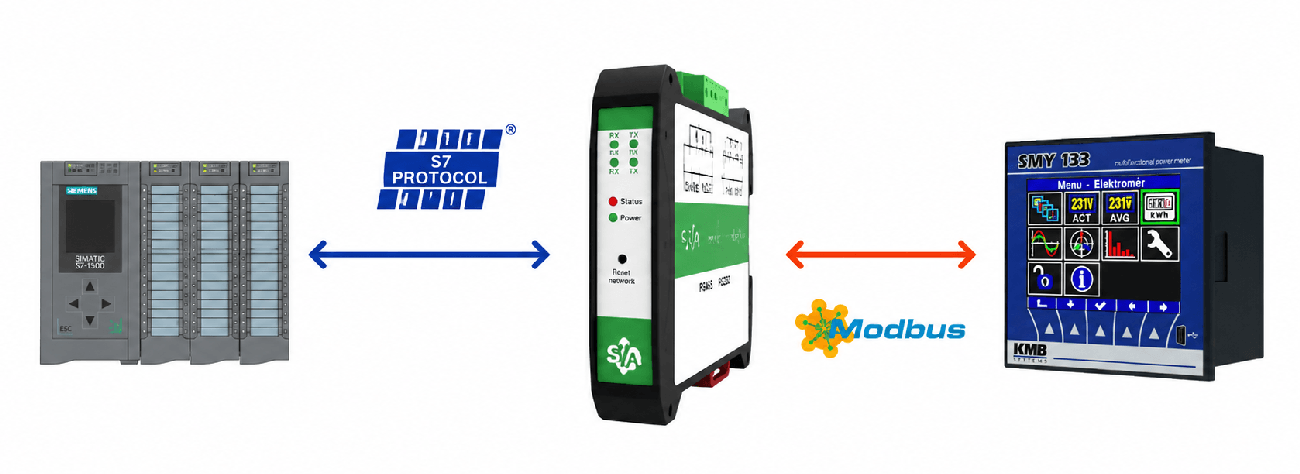
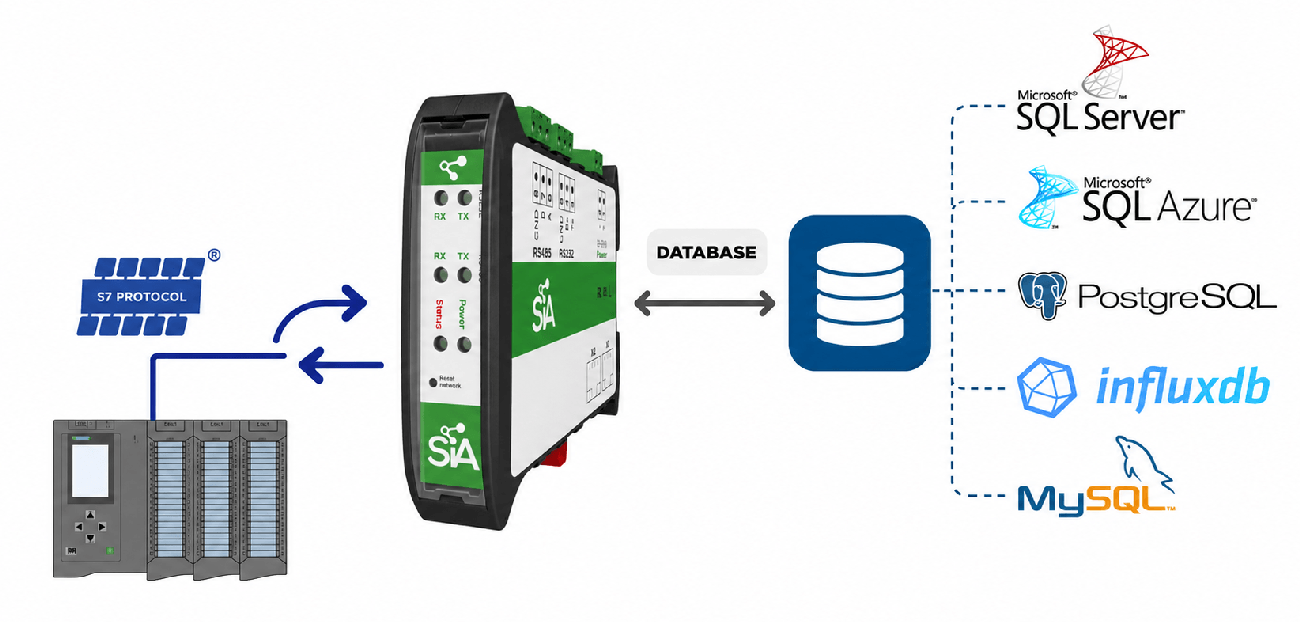
SIA Connect collects data from connected devices and stores it in databases using built-in database connectors. It also works in reverse, reading data from databases and writing it to PLCs. Data transfer can run continuously or according to defined rules. Allows creating SQL SELECT queries for reading database information and sending it to PLCs (e.g. production orders). Also enables custom SQL commands (INSERT, UPDATE) using PLC variables (e.g. writing production batch results to a database).
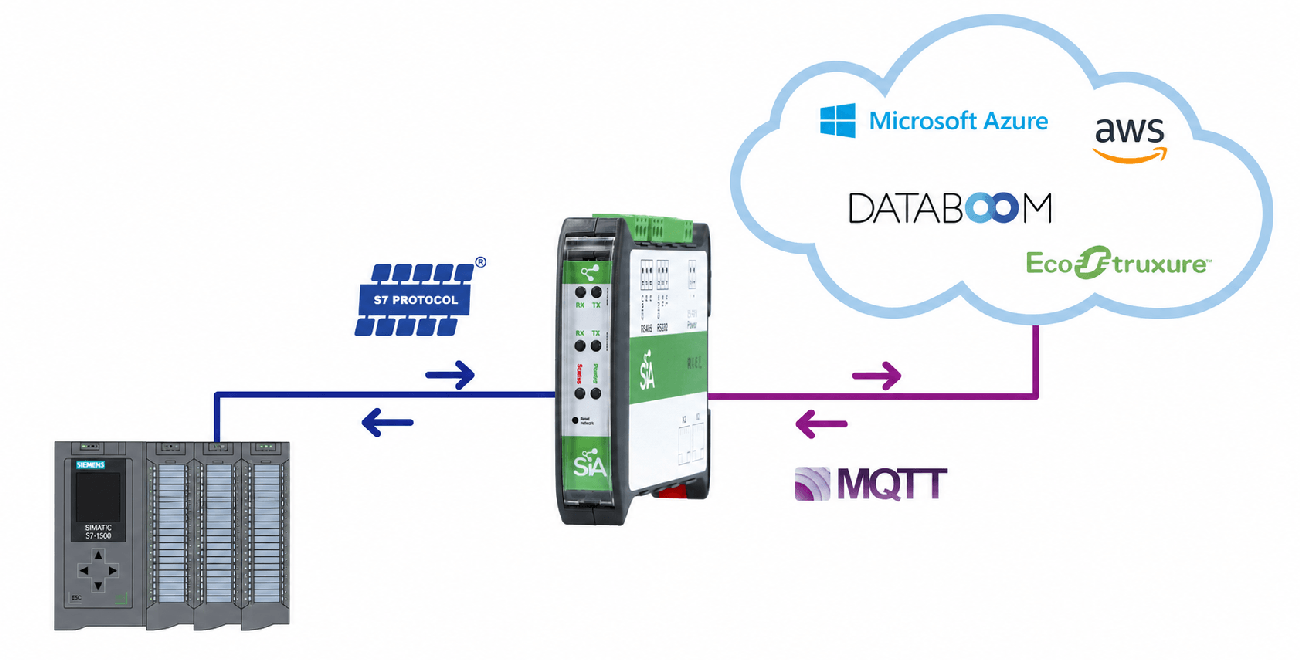
SIA Connect collects data from connected devices and sends it to the cloud using built-in cloud connectors. In the event of a connection loss, data is temporarily stored in internal memory and automatically sent to the cloud once the connection is restored. It also works in reverse, writing cloud data back to PLC systems.
Why choose SIA Connect SW?
- Complete solution – a single software platform reads data from PLCs, stores it in databases, sends it to the cloud, and interconnects devices (PLCs, machines, etc.).
- Bidirectional data transfer – reads data from devices and writes data back.
- Integration of devices from different manufacturers and protocols – supports more than 30 industrial protocols, enabling integration of data across multiple vendors.
- Reliable data transfer – in the event of a database/cloud connection outage, data is stored locally and automatically sent after reconnection.
- Grafana visualization – a plug-in is available for direct use of data in Grafana dashboards.
- Security and access management – encrypted communication (TLS), certificate management (e.g. DigiCert IoT Trust), and user role control.
- Deployment on own hardware – installation on an existing server/PC or embedded device; native on Linux, on Windows and macOS via Docker.
Key features
- Software solution for installation on your own PC/server/embedded device
- Native installation on Linux or operation in Docker (on Windows and macOS via Docker only)
- Licensing based on the number of values (items) – hundreds up to 7,500+ depending on the variant
- Configuration via a web interface without complex programming
- Functions as both an OPC UA server and client for standardized OT/IT communication
- Bidirectional data transfer (OT ↔ IT) – reading and writing values/parameters
- Support for 30+ industrial protocols for devices from different manufacturers
- Local data buffering and delivery during communication outages (store-and-forward)
- Encrypted communication (TLS), certificates, and user roles
- Grafana visualization plug-in (dashboards)
SIA Connect SW is software for collecting data from devices (PLCs, machines, measuring instruments, and building management systems), storing it in databases, and transferring it to the cloud. It is used where there is a need to unify data from devices from different manufacturers and using different protocols (supports 30+ industrial protocols). Data transferred to IT systems (databases, APIs, MQTT) is available for monitoring, reporting, analysis, and visualization. It also enables communication between different connected systems (for example, linking data between Siemens S7 PLCs and Allen-Bradley PLCs, or writing values from an energy meter into a PLC, etc.).
In the event of a connection outage, data is stored locally and automatically sent once the connection is restored (store-and-forward). In practice, this means that data is not lost even during a temporary interruption of the connection to the database or the cloud.
The software can run on a PC, server, or embedded devices. It can be installed either natively on Linux or as a Docker container (on Windows and macOS via Docker only). Connect the PC/device to the Ethernet network and configure the software via the built-in web interface.
Depending on the selected license, it is possible to process hundreds to thousands of values (items) from one or multiple connected devices (temperatures, consumption values, states, number of produced pieces, OK/NOK parts, and other variables). This software variant is suitable where you need higher performance, the option for future expansion, and the ability to leverage existing server or virtual infrastructure.
If, on the other hand, you are looking for a ready-made compact device for installation in a control cabinet that does not require your own server or operating system, and reading a maximum of 500 values is sufficient, you can choose the SIA Connect HW hardware variant.
Installation on any platform
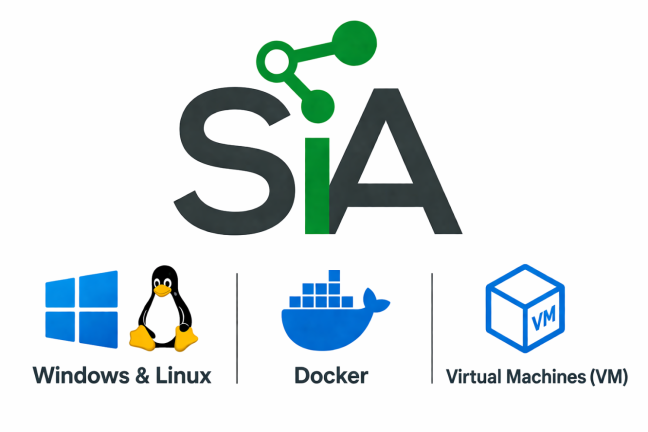
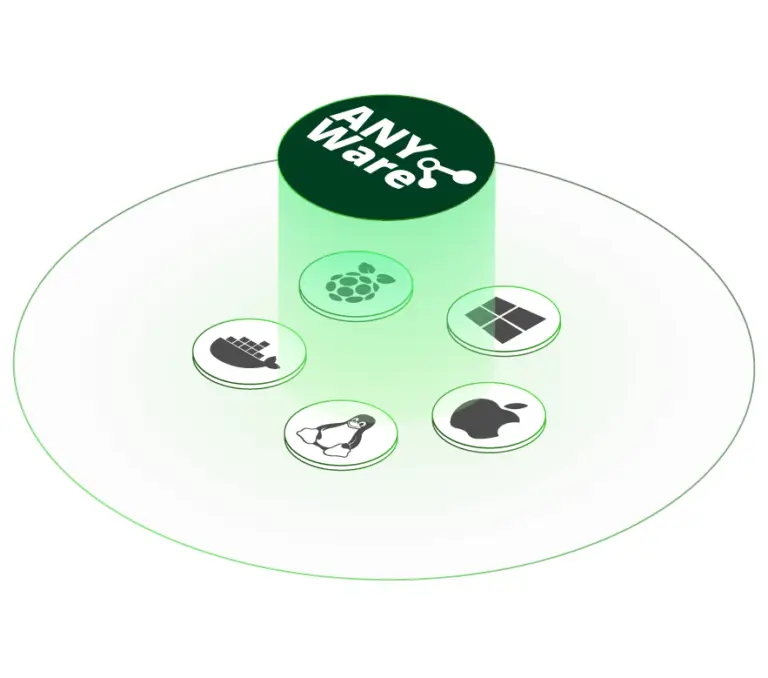
SIA Connect SW (ANY-Ware) can be easily installed and operated on virtually any system anywhere in the operational environment.
- SIA Connect SW for Docker
As a virtualized Docker image, it can be installed on any system: Linux, macOS, Windows, or industrial PCs.
- SIA Connect SW for Windows
Built on Docker Desktop and delivered with ready-to-use executables, enabling easy startup and management.
- SIA Connect SW for Linux & Yocto
Can be installed natively as a service on any Debian-based OS, such as Ubuntu, or deployed using a Yocto build for embedded devices.
SIA Connect SW is included as part of a compact hardware module designed for plug-and-play deployment.
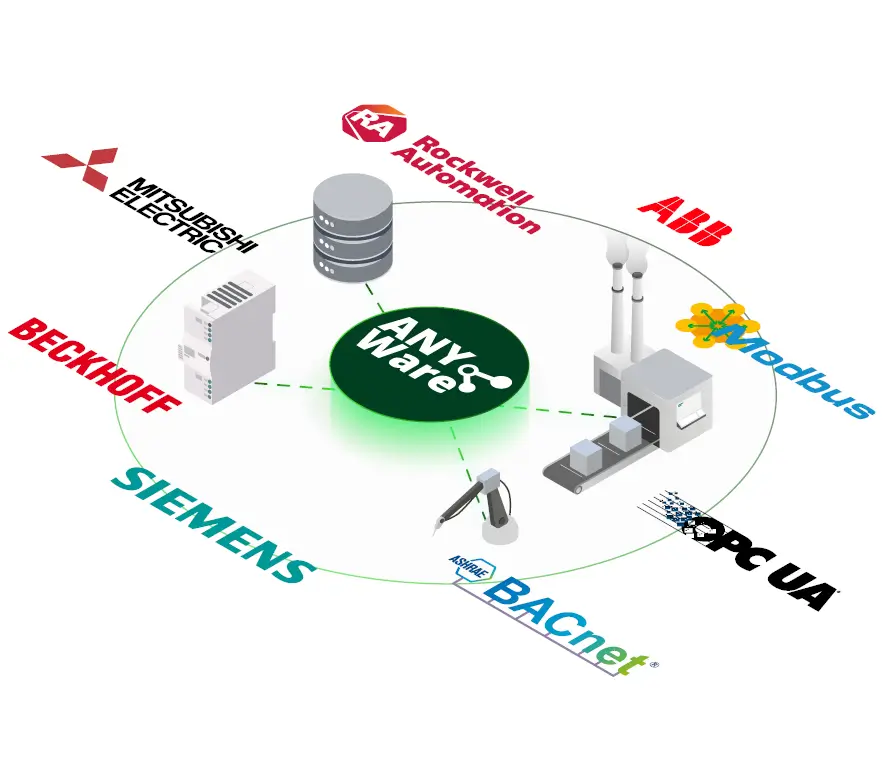
Connection to any industrial device
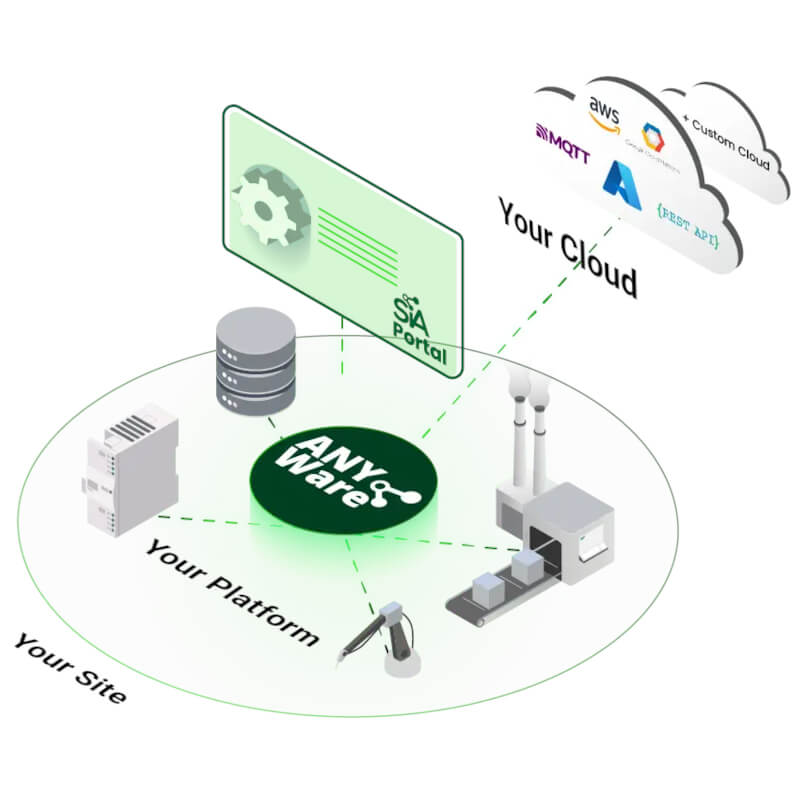
Thanks to a rich library of connectors, various devices on the production line can be easily interconnected and industrial systems can be efficiently bridged with IT. SIA Connect enables fast integration of PLCs, machines, and sensors from different manufacturers, allowing data to be collected from across the entire technology stack from a single point. Deployment takes just minutes via an intuitive web interface, without the need for programming.
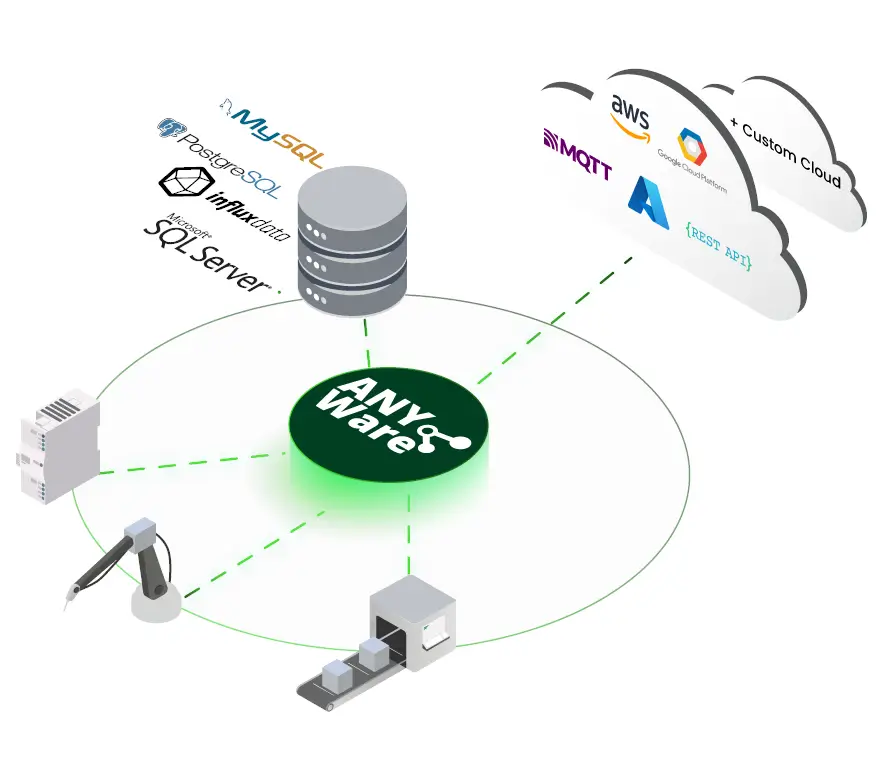
Connection to any cloud and database
Data can be collected and flexibly transferred to any database or cloud platform. The transfer is bidirectional, allowing not only telemetry and historical data to be sent, but also commands or parameters to be received back from higher-level control systems. SIA Connect supports modern IoT standards and, thanks to its open approach, enables integration with any enterprise system or analytics platform.
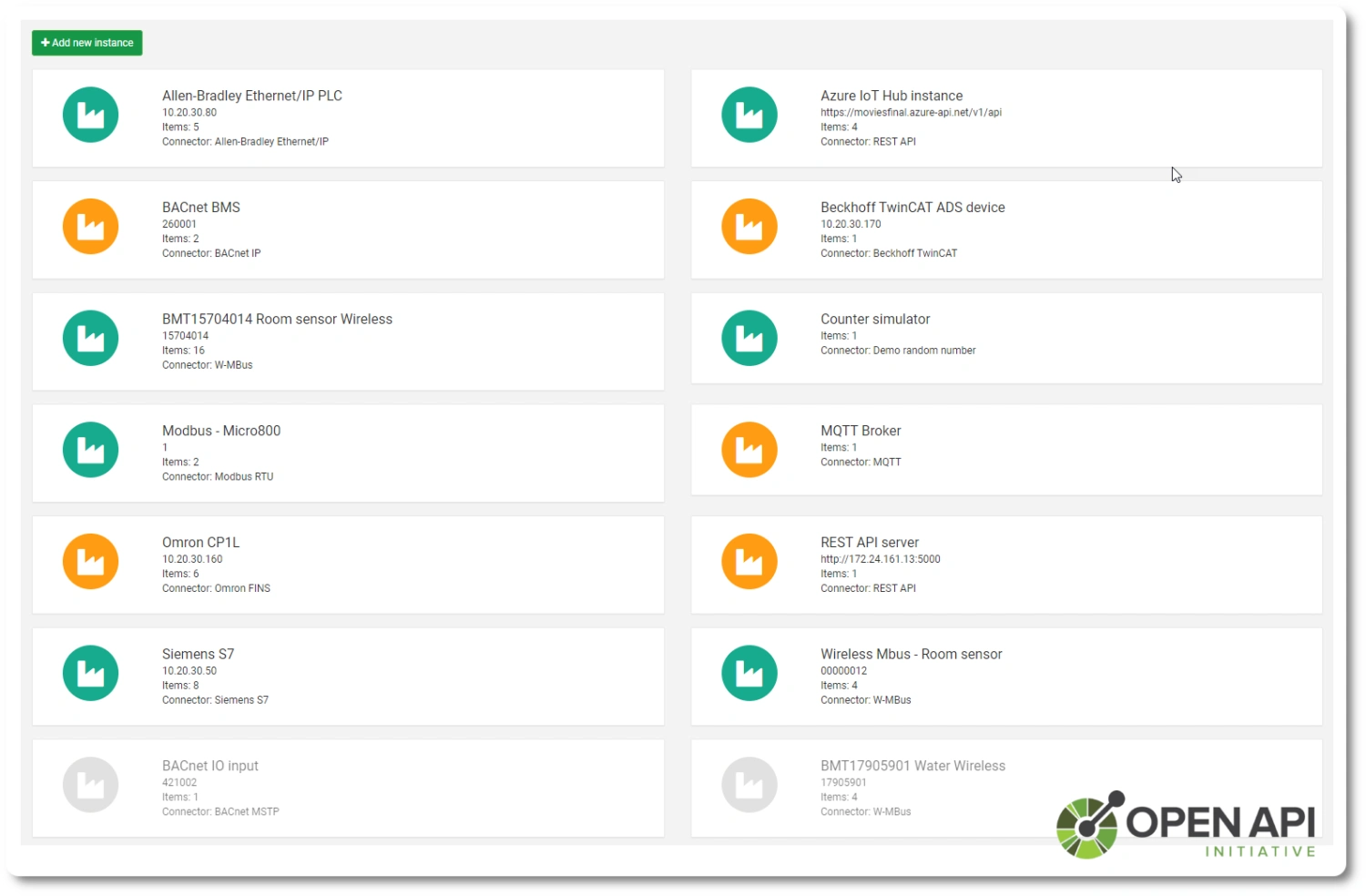
Open REST API
SIA Connect includes an open REST API that allows developers to integrate the gateway into their own solutions and tailor it to their needs. It provides all the functions required to build a custom user interface (dashboards, monitoring, and data management).
Datenverarbeitung anhand eines konkreten Beispiels
Die SPS übermittelt die Temperatur als Ganzzahl. SIA Connect rechnet sie um, ergänzt die Maschinenkennung und übergibt sie im gewünschten Format an die Anwendung.
Wert aus der SPS
237Die Temperatur wird in Zehntelgrad angegeben.
Einheitenumrechnung
23,7 °C237 ÷ 10Der mathematische Ausdruck dividiert den Eingabewert durch zehn.
Nachricht erstellen
{"machine":"demo-01",
"temp_c":23.7}
Fügen Sie der JSON-Nachricht die Maschinenbezeichnung sowie die umgerechnete Temperatur hinzu.
Übermittlung an die Anwendung
MQTT / SQLSenden Sie eine Nachricht an den MQTT-Broker oder ordnen Sie den Wert einem Datenbank-Konnektor zu.
Der Änderungsfilter unterdrückt wiederholte Werte
Eingang aus der SPSBei aktiviertem Änderungsfilter wird der zweite identische Wert nicht gesendet. Die Zielanwendung erhält 23,7 °C und anschließend 24,1 °C.
Datenübertragung bei Ausfall der Zielverbindung
23,7 °C → MQTT
Die Werte werden erfasst und an die Zielanwendung weitergeleitet.
23,7 · 24,1 · 25,0 °C
Bei aktivierter „Store & Forward“-Funktion werden die Werte in der lokalen Warteschlange gespeichert.
23,7 → 24,1 → 25,0 °C
Im Beispiel mit dem FIFO-Modus werden die ältesten gespeicherten Werte zuerst ausgegeben.
Die Warteschlangenkapazität, die Abfrageintervalle und der Sendemodus werden projektbezogen eingestellt. Das Schema veranschaulicht den Ausfall der Zielverbindung bei laufendem SIA Connect.
Das Beispiel erläutert das Prinzip. Es handelt sich nicht um eine tatsächliche Messaufzeichnung oder eine fertige Konfiguration. Konnektoren, Mappings und Datenspeicherung richten Sie für Ihre Anwendung ein.
Anwendungsvideos zu SIA Connect
Ausgewählte Anleitungen des Herstellers zeigen die tatsächliche Konfiguration. Die Videos sind in englischer Sprache; Bezeichnungen und Erläuterungen finden Sie weiter unten.
Gemeinsame Datenfunktionen von V1, Plus und ANY-Ware. Die Schnittstellen unterscheiden sich je nach Softwareversion.
SPS und Industriegeräte mit MQTT verbinden
Erfassung von Daten aus Industrieanlagen und deren Bereitstellung über MQTT für weitere Anwendungen.
Auf YouTube öffnenHersteller-Video zu SIA Connect · auf Englisch
SPS-Daten zu einer MQTT-Nachricht zusammenführen
SPS-Werte aufbereiten und eine eigene Nachricht für die Zielanwendung erstellen. Eine praktische Ergänzung zum Beispiel für Datenumrechnung und Formatierung.
Auf YouTube öffnenHersteller-Video zu SIA Connect · auf Englisch
Installation von ANY-Ware mit Docker Compose
Anleitung zur Installation der Software auf Ihrer eigenen Hardware. Sie zeigt die Projektvorbereitung, die Passworteinrichtung und den Start von SIA Connect in Docker.
Anleitung des Herstellers öffnenHersteller-Video zu SIA Connect · auf Englisch
Dashboard mit den in Grafana erfassten Daten
Datenaufzeichnung aktivieren, die SIA Connect-Datenquelle verbinden und die erste Visualisierung erstellen. Die Anleitung gilt für Plus und ANY-Ware mit Docker-Unterstützung.
Anleitung des Herstellers öffnenHersteller-Video zu SIA Connect · auf Englisch
Grafana und Container-Anwendungen: Plus und ANY-Ware. Der Betrieb hängt von der Installation und den verfügbaren Ressourcen ab.
Unterstützte Industriegeräte und Protokolle
SIA Connect ANY-Ware unterstützt mehr als 40 Industrie- und IT-Protokolle für die Kommunikation mit SPS-Steuerungen, Robotern, Messgeräten, Gebäudeautomationssystemen und anderen Industriegeräten. Die unterstützten Konnektoren sind ohne zusätzliche Gebühren für einzelne Protokolle in der Software enthalten.
- Allen-Bradley (Rockwell Automation)
- ControlLogix, CompactLogix, FlexLogix
- MicroLogix, Micro8xx
- SLC500*, PLC5* (* Unterstützung über eine DH+-Bridge)
- BACnet IP
- BACnet MS/TP
- Beckhoff TwinCAT ADS
- TwinCAT 2, TwinCAT 3
- BX9xxx, BC9xxx
- EtherNet/IP (CIP)
- GenICam
- GigE Vision, USB3 Vision
- Industrielle Kamerasysteme
- ifm VSE
- VSE153, VSE151, VSE150
- VSE101, VSE100, VSE003, VSE002
- Keyence KV Ethernet
- KV-3xxx, KV-5xxx
- KV-700, KV-7xxx, KV-8xxx
- KV Nano
- Mitsubishi MELSEC Ethernet
- FX3, FX5
- iQ-F, iQ-R
- A, L, Q, QnA
- Modbus TCP
- Modbus RTU
- Modbus RTU over TCP
- M-Bus
- Erfordert einen M-Bus-auf-RS-232- oder RS-485-Konverter.
- Wireless M-Bus (wM-Bus)
- Modi C, S und T
- Erfordert einen kompatiblen Wireless-M-Bus-USB-Empfänger.
- MTConnect
- NITP in CAMP
- Siemens TI505
- National Instruments TI505
- CTi (Control Technology) Series 2500 und Series 500
- Omron EtherNet/IP
- Omron FINS Ethernet
- CP, CJ, CS, CV, NSJ, NX, NJ
- Omron Host Link
- Kommunikation über RS-232
- OPC UA Client
- OPC UA Server
- Siemens S5
- Unterstützung über einen Adapter, beispielsweise IBH Link S7++
- Siemens S7
- S7-200, S7-300, S7-400, S7-1200, S7-1500
- Unterstützung der absoluten Adressierung
- Für S7-200 ist ein Ethernet-Modul erforderlich, beispielsweise CP243.
- Siemens S7 Plus
- S7-1200, S7-1500
- Unterstützung optimierter Datenbausteine und symbolischer Adressierung
- Siemens LOGO!
- Socket TCP Server
- Kommunikation über benutzerdefinierte TCP-basierte Protokolle
- Socket TCP Client
- Kommunikation über benutzerdefinierte TCP-basierte Protokolle
- TRUMPF
- Werkzeugmaschinen und Lasermaschinen
- Universal Robots RTDE
- UR3, UR5, UR10, UR16
- Simulator
- Integrierter Datensimulator
Weitere unterstützte Industriegeräte
Geräte anderer Hersteller können ebenfalls über unterstützte Standardprotokolle angebunden werden.
- ABB – Geräte mit Kommunikation über Modbus TCP oder Modbus RTU
- Schneider Electric – Geräte mit Kommunikation über Modbus TCP oder Modbus RTU
Die Kompatibilität eines bestimmten Geräts hängt von seiner Kommunikationsschnittstelle und dem unterstützten Protokoll ab.
Unterstützte Cloud- und API-Konnektoren
ANY-Ware ermöglicht die bidirektionale Datenübertragung zwischen Industriegeräten, Cloud-Plattformen und Unternehmensanwendungen.
- MQTT
- Publish/Subscribe und Wildcards
- QoS, TLS, Zertifikate und Retained Messages
- REST API
- Methoden GET, POST, PUT, DELETE
- Authentifizierung über Basic, Bearer, JWT, API-Key und OAuth
- CoAP
- Constrained Application Protocol
- Methoden GET, POST, PUT, DELETE über UDP
- Azure IoT
- Azure IoT Hub
- Device Provisioning Service (DPS)
- Digital Twin
- IoT Edge-Modul
- Authentifizierung über X.509-Zertifikate und symmetrische Schlüssel
- Device-to-Cloud- und Cloud-to-Device-Kommunikation
- AWS IoT Core
- Apache Pulsar
- Cumulocity IoT
- Siemens MindSphere
- Virtual Data
- Virtuelle Datenwerte
- File-/FTP-Konnektor
- Lokale Dateispeicherung und Übertragung über FTP
- Dateiformate CSV, JSON, XML und YAML
Weitere Cloud- und Unternehmensintegrationen
Über Standardschnittstellen wie MQTT und REST API kann die Software auch mit anderen kompatiblen Diensten und Anwendungen verbunden werden. Der Hersteller nennt unter anderem folgende Integrationsbeispiele:
- Google Cloud Platform
- IBM Cloud
- PTC ThingWorx
- AVEVA Insight
- Schneider Electric EcoStruxure
- Bosch IoT Suite
- Microsoft Power BI
- Grafana – Datenvisualisierung und Erstellung von Dashboards
- KaaIoT
Für diese Plattformen steht nicht unbedingt ein eigener nativer Konnektor zur Verfügung. Die Art der Anbindung hängt von den Schnittstellen des jeweiligen Dienstes ab.
Unterstützte Datenbankkonnektoren
ANY-Ware ermöglicht das Lesen und Speichern von Daten in Datenbanken zur weiteren Verarbeitung, Analyse und Speicherung historischer Werte.
- Microsoft SQL Server
- Verschlüsselte TLS-Verbindung
- Ausführung gespeicherter Prozeduren
- Azure SQL
- MySQL / MariaDB
- PostgreSQL
- InfluxDB
- Kommunikation über REST API und InfluxDB API
- MongoDB
Weitere Datenbanken mit Unterstützung auf Anfrage
In der technischen Dokumentation des Herstellers werden außerdem folgende Datenbanken mit Unterstützung auf Anfrage aufgeführt:
- Oracle – über Oracle Call Interface
- IBM DB2
- SQLite
Weitere Softwarefunktionen
- SIA-Webportal (Edge Portal)
- Webbasierte Oberfläche zur Konfiguration und Verwaltung der Software
- Konfiguration angeschlossener Geräte und Datenwerte
- Datenzuordnung zwischen Geräten und Konnektoren
- Überwachung aktueller Werte
- Konvertierung industrieller Protokolle
- Bidirektionale Datenübertragung zwischen Geräten mit unterschiedlichen Protokollen
- Übertragung von Prozesswerten, Sollwerten und Befehlen
- Historian
- Lokale Speicherung historischer Daten
- Darstellung historischer Werte in Diagrammen
- Datenexport in CSV
- Store-and-Forward
- Zwischenspeicherung von Daten bei Kommunikationsausfällen
- Übertragung gespeicherter Daten nach Wiederherstellung der Verbindung
- REST API
- Zugriff auf Gerätefunktionen über eine API
- Shadow API
- Fernzugriff auf die API über MQTT
- Edge Computing
- Filterung und Verarbeitung von Daten direkt auf dem Gerät
- Fernzugriff
- Möglichkeit zur Nutzung von Lösungen wie Tosibox, Secomea, NetBird und zrok
- DigiCert IoT Trust
- Registrierung sowie Ausstellung und Erneuerung von Gerätezertifikaten
Systemanforderungen für die Softwareinstallation
SIA Connect SW (ANY-Ware) kann in einer Docker-Umgebung oder als nativ installierte Anwendung unter Linux betrieben werden.
Installation mit Docker
- Betriebssystem: Windows 10 (Version 1903, Build 18362 oder höher), Windows 11, Windows mit WSL-Unterstützung, macOS, Linux oder ein anderes Docker-kompatibles System
- Architektur: x86 (32 Bit), x86_64 (64 Bit), ARM64 (64 Bit), ARM32 (32 Bit)
- Arbeitsspeicher: mindestens 1 GB RAM
- Speicherplatz: mindestens 1,5 GB
Native Installation unter Linux
- Betriebssystem: Debian-basiertes Linux mit Unterstützung für .deb-Pakete
- Architektur: x86 (32 Bit), x86_64 (64 Bit), ARM64 (64 Bit), ARM32 (32 Bit)
- Arbeitsspeicher: mindestens 1 GB RAM
- Speicherplatz: mindestens 1,5 GB
Anforderungen an den Webbrowser
Für die Konfiguration und Verwaltung der Software steht das SIA-Webportal (Edge Portal) zur Verfügung. Der Hersteller nennt die Kompatibilität mit folgenden Browsern:
- Google Chrome
- Microsoft Edge
- Mozilla Firefox
- Opera
- Safari
- Weitere kompatible moderne Webbrowser
Anforderungen an das Endgerät
Das SIA-Webportal (Edge Portal) ist eine webbasierte Anwendung. Der Zugriff ist von jedem Gerät mit einem kompatiblen Webbrowser möglich.
- Computer: Windows, Linux, macOS, ChromeOS
- Mobile und smarte Geräte: Android, iOS, Tizen, webOS
Zugriff über WLAN mit Smartphone oder Tablet
Für den Zugriff über ein Smartphone oder Tablet muss das Gerät, auf dem SIA Connect ANY-Ware ausgeführt wird, über das Netzwerk erreichbar sein. Der Zugriff erfolgt über das SIA-Webportal (Edge Portal). Das Smartphone oder Tablet kann über WLAN verbunden sein, während das Hostgerät beispielsweise über ein Ethernet-Kabel mit dem Netzwerk verbunden ist.
Frequently Asked Questions about SIA Connect SW
What is SIA Connect SW?
SIA Connect SW is software for collecting, processing, and transferring data between PLCs, machines, databases, and the cloud. It enables both reading and writing of data, local data storage in case of connection outages, and interconnection of devices and systems from different manufacturers. It is designed for installation on your own computer, server, or embedded device.
What is SIA Connect SW used for?
It is used for collecting production and operational data (temperatures, states, piece counts, consumption, OK/NOK, energy, etc.), storing the data in databases, sending it to the cloud and IT systems for monitoring, reporting, analysis, and visualization. It also enables bidirectional data exchange between different devices and systems (OT ↔ IT).
What is the difference between SIA Connect SW and SIA Connect HW?
SIA Connect SW is a software variant intended for installation on your own hardware or in a virtualized environment. It is suitable for projects with a higher number of data points (hundreds to thousands) and for the use of servers, virtualization, or Docker.
SIA Connect HW is a ready-to-use compact hardware device for control cabinet installation, intended for projects up to 500 values, without the need for a dedicated server or operating system.
On which platforms can SIA Connect SW be operated?
The software can be operated on a computer, server, or embedded device. Installation is possible natively on Linux or as a container in Docker. On Windows and macOS systems, only Docker-based deployment is supported.
How much data (values) can SIA Connect SW process?
Depending on the selected license, it is possible to process hundreds to thousands of values (items), up to 7,500+ values. The limiting factor is not the number of devices, but the total number of communicated values.
How many devices or PLCs can be connected to the software?
The number of connected devices or PLCs is not strictly limited. Multiple devices, different manufacturers, and various communication protocols can be combined at the same time. The decisive factor is the licensed number of values.
What types of devices can be connected to SIA Connect SW?
PLCs, production machines, robots, measuring instruments, sensors, energy meters, and building management systems (BMS) from various manufacturers.
Which industrial protocols does SIA Connect SW support?
It supports more than 30 industrial protocols, including Siemens, Allen-Bradley (EtherNet/IP), Mitsubishi, Omron, Beckhoff, Modbus, OPC UA, BACnet, M-Bus, and others.
Does SIA Connect SW support bidirectional communication?
Yes. The software supports bidirectional data transfer – not only reading data from devices, but also writing values back (e.g., setpoints, parameters, or commands).
Does SIA Connect SW work as an OPC UA server or client?
Yes. SIA Connect SW can operate as both an OPC UA server and an OPC UA client, enabling standardized communication between OT and IT systems.
Do I need programming or advanced PLC knowledge for commissioning?
No. Configuration is performed via the built-in web interface in no-code / low-code mode. Basic communication setup and data flows can be handled even by users without PLC programming experience.
How does the initial configuration of SIA Connect SW work?
After installation, you log in to the web interface, create a user, select connectors (PLC, database, cloud), choose values, and configure the mapping between source and destination. No additional software installation is required.
Does SIA Connect SW work during a database or cloud connection outage?
Yes. In the event of a connection outage, data is stored locally and automatically sent once communication is restored (store-and-forward). Data is not lost even during temporary outages.
Which database and cloud solutions are supported?
Common databases and services are supported via connectors, such as SQL databases, MQTT, REST API, and others depending on project configuration. Visualization can be done using tools such as Grafana.
Does SIA Connect SW support integration with MES, SCADA, or ERP systems?
Yes. Thanks to database connectors, REST API, and MQTT, data can be easily integrated with MES, SCADA, ERP systems, and analytical platforms.
Does SIA Connect SW provide an open API?
Yes. An open REST API is included, enabling integration into custom applications, process automation, or the creation of custom dashboards.
How is communication security handled?
Communication is encrypted using TLS. Certificate handling and role-based access control are supported.
Can the software be managed and updated remotely?
Yes. SIA Connect SW allows remote management, configuration, and updates via the web interface.
What license is required to operate SIA Connect SW?
The license is selected based on the number of communicated values (items). Multiple license variants are available depending on project size.
Is SIA Connect SW suitable for large-scale projects?
Yes. The software variant is designed for larger projects with higher data volumes and for the use of servers, virtualization, or Docker.
When should I choose SIA Connect HW instead of the software version?
If you need a ready-to-use compact device for control cabinet installation that does not require a dedicated server or operating system and you only need to read up to 500 values, the SIA Connect HW variant is the better choice.
SIA Connect: collects data from PLCs, stores it in a database, and sends it via OPC UA and MQTT to IT
SIA Connect makes data from industrial devices available where you need it.
Gain real-time insight into production, technologies, or consumption—without complex integration or programming. SIA Connect (software or compact hardware device) connects OT and IT systems and prepares data for monitoring, reporting, analysis, and downstream automation.
Highlighted items are mandatory.
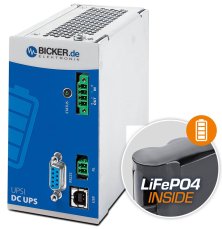
144 W 24 VDC / 6 A UPS backup power supply Bicker, LiFePO4 battery
391,51 EUR Inkl. MwSt.
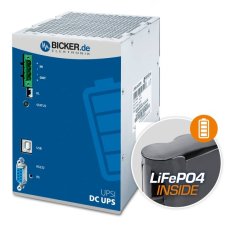
240 W 24 VDC / 10 A UPS backup power supply Bicker, LiFePO4 battery
759,22 EUR Inkl. MwSt.
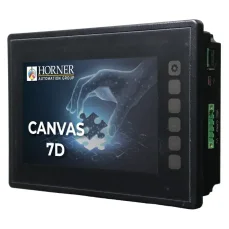
HORNER CANVAS 7D PLC HMI controller with 7″ colour touchscreen, analog / digital inputs and outputs
1 809,99 EUR Inkl. MwSt.

Training PROFINET – Basics, Diagnostics & Network Troubleshooting, 2 days
961,52 EUR Inkl. MwSt.

Training PROFIBUS - Basics, Diagnostics & Network Troubleshooting, 2 days
961,52 EUR Inkl. MwSt.
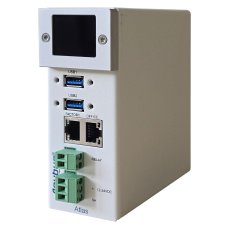
Atlas2 Plus OLED Display: PROFINET Permanent Monitoring Kit 100 tester
4 952,78 EUR Inkl. MwSt.
PNT PROFINET Tool software tester
1 535,10 EUR Inkl. MwSt.
Related products7
144 W 24 VDC / 6 A UPS backup power supply Bicker, LiFePO4 battery
391,51 EUR Inkl. MwSt.
240 W 24 VDC / 10 A UPS backup power supply Bicker, LiFePO4 battery
759,22 EUR Inkl. MwSt.
HORNER CANVAS 7D PLC HMI controller with 7″ colour touchscreen, analog / digital inputs and outputs
1 809,99 EUR Inkl. MwSt.
Training PROFINET – Basics, Diagnostics & Network Troubleshooting, 2 days
961,52 EUR Inkl. MwSt.
Training PROFIBUS - Basics, Diagnostics & Network Troubleshooting, 2 days
961,52 EUR Inkl. MwSt.
Atlas2 Plus OLED Display: PROFINET Permanent Monitoring Kit 100 tester
4 952,78 EUR Inkl. MwSt.
PNT PROFINET Tool software tester
1 535,10 EUR Inkl. MwSt.