

MQTT Sparkplug Plug-in for OPC Router - License type: Subscription license for 1 year

The plug-in adds MQTT Client functionality to the OPC Router with support for the MQTT Sparkplug protocol. This allows the OPC Router to connect to data from the MQTT Broker or to provide its data in MQTT format. More
Code: OPCR-SPRKPL-SUB-PROD
The plug-in adds MQTT Client functionality to the OPC Router with support for the MQTT Sparkplug protocol. This allows the OPC Router to connect to data from the MQTT Broker or to provide its data in MQTT format. More
Code: OPCR-SPRKPL-SUB-PROD
Options 9
| License type | Code | Verfügbarkeit | Price Exkl. MwSt. | |
|---|---|---|---|---|
| Subscription license for 1 year | OPCR-SPRKPL-SUB-PROD | In stock |
465 EUR
|
|
| Subscription license for 2 years | OPCR-SPRKPL-SUB-PROD 2x | In stock |
930 EUR
|
|
| Subscription license for 3 years | OPCR-SPRKPL-SUB-PROD 3x | In stock |
1 395 EUR
|
|
| Perpetual (permanent) license with 1 year support | OPCR-SPRKPL-PRP-PROD + OPCR-SPRKPL-ATT-PROD | In stock |
1 081 EUR
|
|
| Perpetual license with 2 years support | OPCR-SPRKPL-PRP-PROD + OPCR-SPRKPL-ATT-PROD + OPCR-SPRKPL-EXT-PROD | In stock |
1 283 EUR
|
|
| Perpetual license with 3 years support | OPCR-SPRKPL-PRP-PROD + OPCR-SPRKPL-ATT-PROD + 2x OPCR-SPRKPL-EXT-PROD | In stock |
1 485 EUR
|
|
| Perpetual license support extension for 1 year | OPCR-SPRKPL-EXT-PROD 1x | In stock |
202 EUR
|
|
| Perpetual license support extension for 2 years | OPCR-SPRKPL-EXT-PROD 2x | In stock |
404 EUR
|
|
| Perpetual license support extension for 3 years | OPCR-SPRKPL-EXT-PROD 3x | In stock |
606 EUR
|
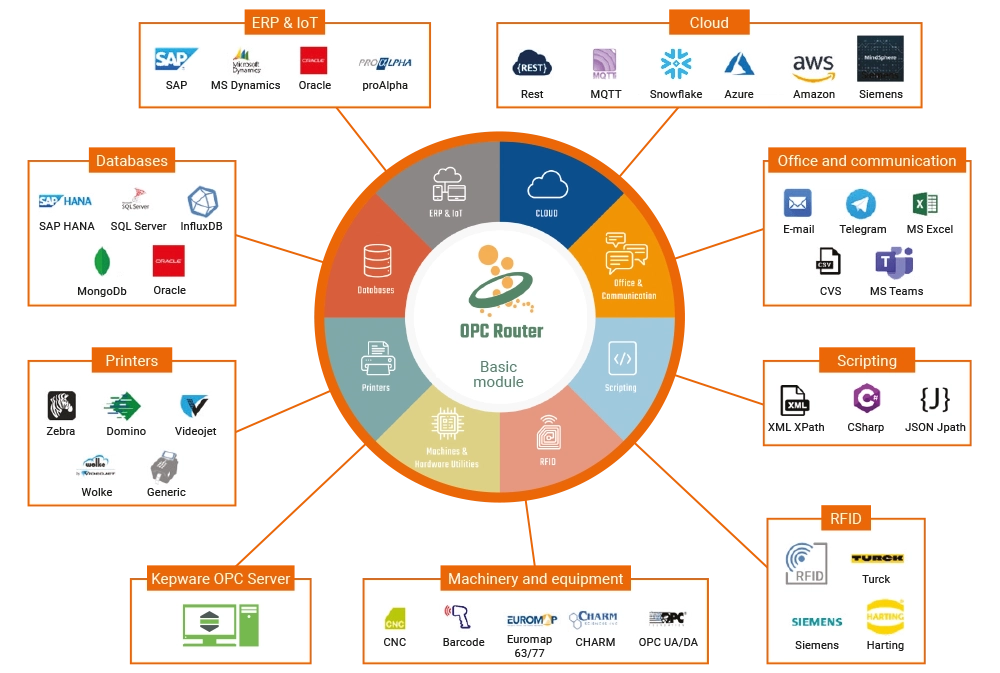
OPC Router is a software program that allows you to connect data from various industrial devices and IT/OT systems to each other. All this quickly, automatically and without programming knowledge. In addition, you can see all data flows in a clear visualization.
Collect data, connect systems, perform calculations, compare values and enter results into databases. You can do all this with OPC Router for PLC systems, OPC servers, printers, RFID readers, emails, Excel spreadsheets, databases, cloud systems, MQTT brokers, ERP systems SAP R3, SAP HANA, etc. For installation on a single computer you need a basic module and one or more plug-in modules.
The connection of your Sparkplug Plug-in is quite simple and intuitive with the OPC Router via drag & drop. Our screenshots show exemplary Sparkplug transfers. In the first screenshot, the OPC Router receives the information that data has changed on the OPC Server. At the same time, it sends this change as a node to the MQTT broker and stores it in a database. In the second screenshot, the OPC Router receives data from the MQTT broker as a subscriber. This data is stored directly in the database.
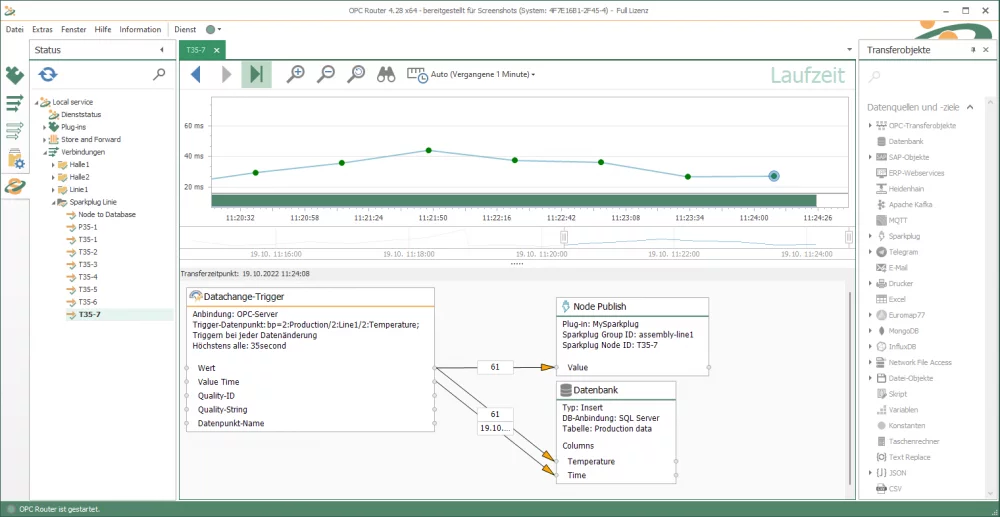
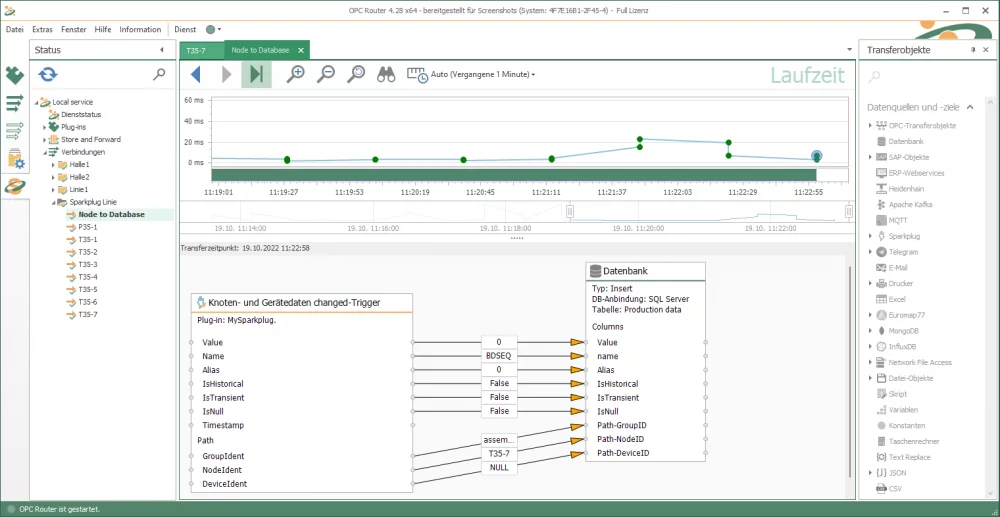
Connecting systems with the OPC Router Sparkplug Plug-in
Transfer-Objects
The Sparkplug Plug-in has two transfer objects that turn the OPC Router into a publisher.
Sparkplug Node Publish
With the Sparkplug Node Publish transfer object, the OPC Router sends as node within the MQTT communication. The Transfer object is responsible for sending information and data to the MQTT broker.
Sparkplug Application Command
The Sparkplug Application Command transfer object turns the OPC Router into a sender as an application. Data can be sent to the MQTT broker via the transfer object.
Trigger
The Sparkplug Plug-in has two triggers that complete the Subscribe principle.
Sparkplug Node Device Data
The Sparkplug Node Device Data Trigger is triggered when data changes. On the signal, the OPC Router as node receives the data via MQTT from the MQTT broker.
Sparkplug Command Trigger
The Sparkplug Command Trigger turns the OPC Router as application into a subscriber. The trigger is released when the MQTT broker has received new information. This information is then sent to the OPC Router.
Browsing
Browsing is offered via the Sparkplug Plug-in transfer objects. The MQTT payloads set in production are available for selection in the dropdown.
System Requirements
Installation and Update
The OPC Router setup installs the configuration environment, Windows services and all plug-ins in demo mode with a runtime of 2 hours. Licensed plug-ins can only be run without time limitation after entering the license key.
The installation does not include a database system or an OPC server for production use. These components must be installed separately and then connected in the OPC Router configuration.
Computer Performance
OPC Router is a server application, so we recommend running it on suitable hardware. For standard use, we recommend:
- a multi-core processor,
- at least 8 GB RAM,
- SSD storage.
Operating System
For production use, we recommend Microsoft Windows Server operating systems. 64-bit client operating systems can also be used, especially for testing purposes.
Supported operating systems:
- Windows Server 2016 x64
- Windows Server 2019 x64
- Windows Server 2022 x64
- Windows Server 2025 x64
- Windows 10 x64
- Windows 10 IoT x64
- Windows 11 x64
Running in Docker
OPC Router can also be run in a Docker container, for example on an Edge device or a Windows device. The minimum requirements for running OPC Router in a Docker container are:
- 64-bit single-core 600 MHz CPU with AVX support,
- 512 MB RAM,
- 3 GB of free disk space.
.NET 8
OPC Router requires .NET 8. If it is not installed on the system, the OPC Router setup will install it if necessary.
In production environments, we recommend installing .NET 8 manually from Microsoft before updating OPC Router. The .NET installation may require Windows updates, take longer to complete and sometimes require several restarts. To reduce downtime, we recommend uninstalling older .NET versions only after .NET 8 has been installed successfully.
OPC Server
To connect controllers via OPC, an installed and accessible OPC server must be available. OPC Router supports connections via OPC DA 4.0, OPC UA and OPC XML.
The corresponding OPC plug-in is required for communication with an OPC server.
Database Server and Data Sources
Database servers are not part of the OPC Router installation. If you want to connect them to OPC Router, they must be installed and made accessible separately.
OPC Router supports connections to the following database systems and interfaces:
- Microsoft SQL Server
- Oracle
- MySQL
- SAP HANA
- OLE DB
- systems accessible via ODBC
The following databases, data sources or files can also be connected:
- MS Access
- SQLite
- dBase
- InfluxDB
- MongoDB
- XML files
Plug-ins for database communication are not included in the Basic license. The appropriate plug-in must be selected for the specific type of database connection.
Oracle Database Connection
To connect to an Oracle database, Oracle Instant Client (ODAC) must be installed.
SAP Plug-in
The SAP Plug-in supports SAP systems version 4.0b and higher. SAP Logon Pad or the librfc32.dll library must be installed on the computer running OPC Router.
To use SAP NetWeaver, SAP NetWeaver RFC SDK must be installed.
The SAP Plug-in is a separately licensed module and is not included in the Basic license.
New features in the OPC Router 5.1 data hub
The new version of OPC Router 5 brings some big changes. The biggest change is the user interface, which brings the user more comfort when working with the program and the ability to work in Linux, macOS, etc. There are also new options for creating user accounts, improvements in application performance optimization and many other improvements.
Highlighted items are mandatory.

OPC Router – Basic Module
282,03 EUR Inkl. MwSt.
TOP 30 OPC UA and OT/IT Data converters in a Single OPC Router License
2 368,10 EUR Inkl. MwSt.
Related products2
OPC Router – Basic Module
282,03 EUR Inkl. MwSt.
TOP 30 OPC UA and OT/IT Data converters in a Single OPC Router License
2 368,10 EUR Inkl. MwSt.